Free trial
$0
3 days, every feature
- All detection, review and batch features
- Six checks on every copy
- No card, no account
- After the trial: copies carry a TRIAL mark and no report
PDF redaction for macOS and Windows
Permanently remove sensitive information from PDFs and scans. Save a checked copy and a report, without uploading your documents.
Original preview
Example data only. No file is uploaded.
No cloud.
Nothing is uploaded, ever. There is no upload path in the app.
No servers.
Your documents never touch a server: not ours, not anyone's.
100% private.
Every page is processed on your Mac or PC, even offline.
The app connects only to check your license key, to send error reports and, if you allow it, to fetch signed rule updates. No document data is ever sent.
01 / The problem
Many tools only paint over the page. The text is still in the file: copy, search or a metadata viewer brings it back. RedactFirst rebuilds every redacted page, so there is nothing underneath to find.
Patient: Jane R. Doe
SSN: 481-55-9027
Copied text: 481-55-9027
Patient: Jane R. Doe
SSN:
Copied text: (nothing)
Example data. Redacted pages become images, so their text can no longer be selected or searched; pages you did not redact keep their text.
02 / How it works
Your original file is never changed. RedactFirst always writes a new, single-revision copy.
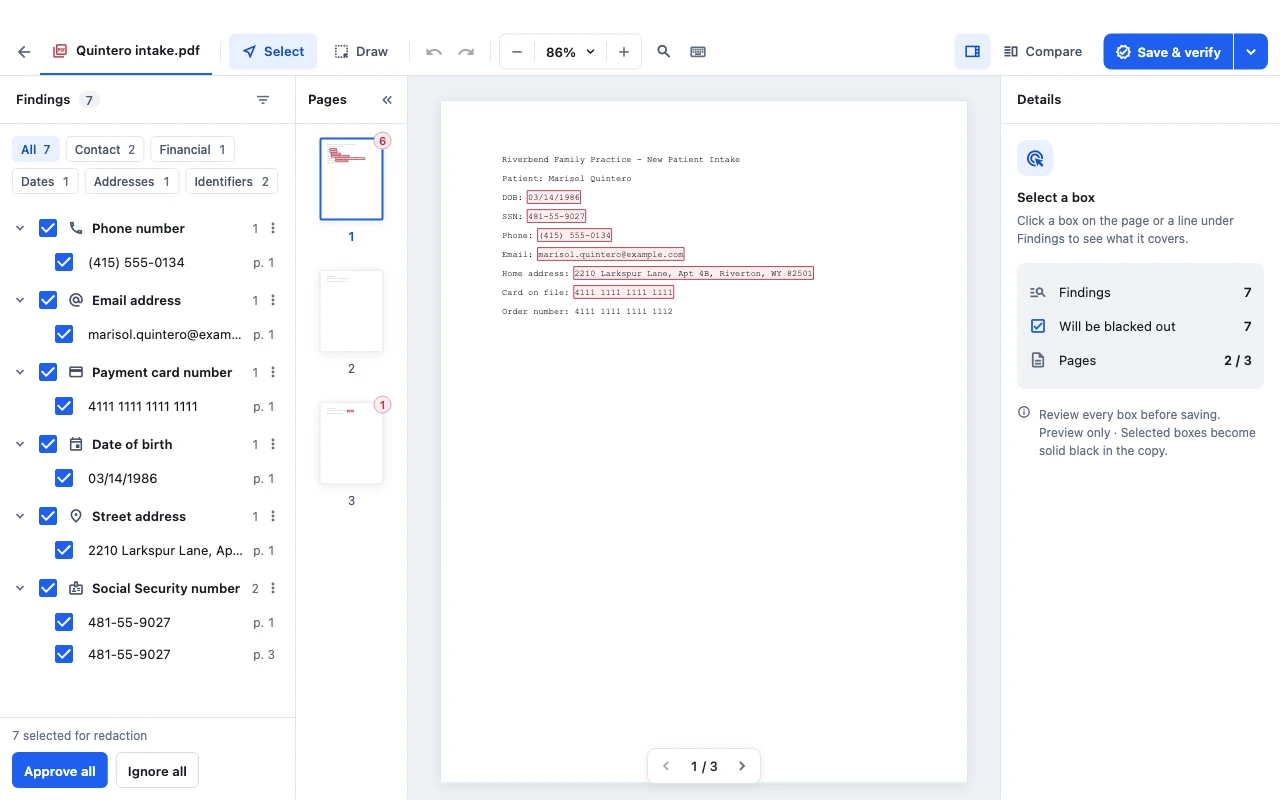
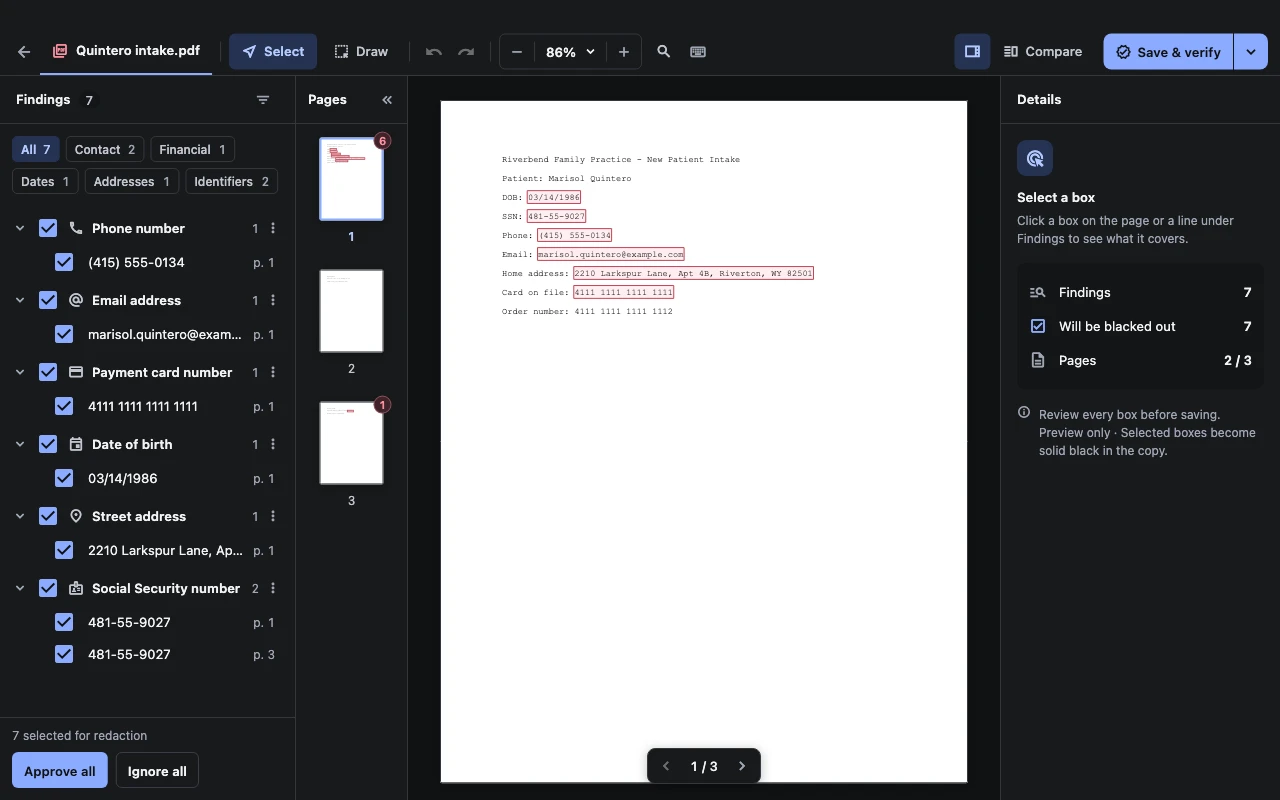
Open a PDF, a scan or a whole folder. A rule set suggests what to remove: SSNs, card and account numbers, emails, phone numbers, dates of birth, addresses, names and your own word lists. Scanned pages are read with the text recognition built into your computer.
Every suggestion is a box you approve, ignore or redraw. Label boxes PII, PHI, PRIVILEGED or (b)(6). Find one value and RedactFirst marks it everywhere, in every way it is written.
RedactFirst rebuilds the copy, re-opens it from disk and runs six checks that do not share code with the redaction itself. Only a copy that passes is saved, next to its PDF and JSON report.
03 / Verification
The check is independent of the code that removed the text. If any check fails, the copy is held back, and RedactFirst shows which text remained on which page, masked.
How the engine works →
Every saved copy keeps its pages and little else. These are removed from every output:
04 / Private by design
05 / Built for real caseloads
Checksums keep numbers honest: card numbers pass Luhn, IBANs pass mod 97, routing numbers pass their checksum, before they are ever suggested.
What RedactFirst finds
Drop a folder, apply one rule set, get a folder of checked copies and a summary report.
Automatically redact new files in a chosen folder while the app is open, using your selected rule set. Files are processed without manual review.
Ready-made sets by line of work. Save and share your own as JSON, and try them on sample text first.
A PDF and JSON report per copy: SHA-256 of input and output, rule set, every redaction by page and type, every check.
Per-box labels such as PII, PHI or (b)(6), page stamps and Bates numbering.
Original and redacted preview side by side, with the list of pages that change.
Finder's Open With, the Services menu, Explorer's right-click menu or the command line.
Every copy with its report details, kept locally. Turn it off or clear it any time.
English, Spanish, German, French (Canada), Portuguese (Brazil) and Turkish.
06 / Who it is for
Remove details you do not need to share from your own documents, directly on your computer.
Prepare client, employee and business documents for sharing, with reviewed redactions and a verification report.
The same license terms cover personal and business use.
Exhibits, productions and filings with privileged or personal details.
Returns, statements and payroll with SSNs, EINs and account numbers.
Applications, reviews and investigations shared outside the team.
Records and claims that must go out without patient identifiers.
Policy and claim files with personal and financial data.
FOIA and access-to-information releases with exemption labels.
07 / Compare
See how RedactFirst differs from cover-up tools, subscription PDF suites and cloud services.
See the comparison →08 / Pricing
Licenses are sold by Lemon Squeezy, our merchant of record, which handles US sales tax, Canadian GST/HST/PST and EU VAT. Prices in CAD and EUR are shown at checkout.
Need seats for a team, a purchase order or an invoice? Talk to us.
$0
3 days, every feature
$79.99
One-time purchase, plus tax
refund policy · license agreement · See the refund policy and the license agreement. A later major version may be a paid upgrade.
09 / Download
Install from the store you already trust, or download directly. Every version starts with the 3-day trial.
Downloads are not available yet. Contact us for release availability.
Ask about availabilityDirect download
Windows 11 on Arm runs the x64 build. Not supported: macOS 11 and earlier, 32-bit Windows, Windows 7 and 8, Linux. A license bought on this site works with the direct downloads; purchases in the Mac App Store or Microsoft Store are handled by that store.
Trust
What we can back up about your privacy, your data and your payment. We hold no certification ourselves; where a certification is named, it belongs to the provider that holds it.
Privacy and security in detail →Stays on this computer
Documents are redacted on your Mac or PC and never uploaded. Your originals are not changed.
GDPR
Your documents are processed on your computer. Error reports rely on legitimate interest, and you can turn optional diagnostics off.
California privacy (CCPA/CPRA)
We do not sell or share your personal information.
HIPAA: local processing
Documents are redacted on your computer and never uploaded, so we do not receive or store protected health information (PHI). Your organization stays responsible for its HIPAA compliance; we do not sign Business Associate Agreements.


Sentry: ISO 27001 and SOC 2 Type 2
Error reports are processed by Sentry, which holds these certifications.
License stored securely
The app keeps your license in the macOS Keychain, or on Windows in storage protected by DPAPI.
Where you buy




Payments by Lemon Squeezy and Stripe
Website purchases are handled by Lemon Squeezy, a Stripe company and the merchant of record; payments run on Stripe's PCI DSS Level 1 certified infrastructure. We never see your card.

Mac App Store
If you buy the Mac App Store edition, Apple handles the purchase, payment and refunds.


Microsoft Store
If you buy the Microsoft Store edition, Microsoft handles the purchase, payment and refunds.
10 / Questions
Yes. Every page with a redaction is rebuilt as a picture with the boxes painted into its pixels, so the text under a box no longer exists in the copy. The copy is then re-opened from disk and checked six ways. A copy that fails is not saved.
No. RedactFirst has no cloud service. Documents, their text and what RedactFirst finds are never sent anywhere. The app only connects to check a license key, to send error reports that contain no files or document contents and, if you allow it, to download signed rule template updates.
Yes. Pages without a text layer are read with the text recognition built into macOS or Windows. Recognized boxes are drawn generously and the app asks you to look closely, because recognition of scans is never perfect.
No software can do that on its own. RedactFirst is a tool that helps you remove information and documents what it did; you decide what to remove and remain responsible for your obligations. Its suggestions can miss things, so review every page.
You can still open, search and review documents. Copies you save carry the word TRIAL across every page and come without a report until you activate a license. Your settings and rule sets are kept.
Yes. One license key works on macOS and Windows, in any mix, on computers you own or control. You buy a number of computers, not an operating system.
A license is a one-time purchase for 1, 3 or 5 computers, depending on the package you choose. Each computer where you enter the key uses one of them. To move to a new computer, choose Remove license from this computer in Settings > License on the old one, then enter the key on the new one. If the old computer is lost or broken, write to support and we will free its activation.
On macOS, names are suggested with the language tools built into the system. On Windows, names are found from the word list you enter, such as client or patient names. Every other detector works the same on both.
PDF, including password-protected PDFs, and scanned images in PNG, JPEG and TIFF. Images are turned into a PDF first and then redacted like any other document.
No cloud · No servers · 100% private